
Understanding TP-Link Router Speeds: Link Rates, Internet Limits, and Mbps
Advertised wireless rates, negotiated link speeds, and measured internet speeds describe different things. These FAQs explain Ethernet limits, client capabilities, speed tests, and the difference between Mbps and MBps.
What We Know
A TP-Link router’s advertised speed does not describe every connection it handles. Distinguishing wireless signal rate, negotiated link speed, and actual internet throughput helps explain performance differences.
How Can I Measure Internet Speed?
Test from a PC or smartphone using https://www.speedtest.net/ or its app at https://www.speedtest.net/apps. Repeat the test several times because network fluctuations and line disturbances can affect individual results.
What Does Signal Rate Describe?
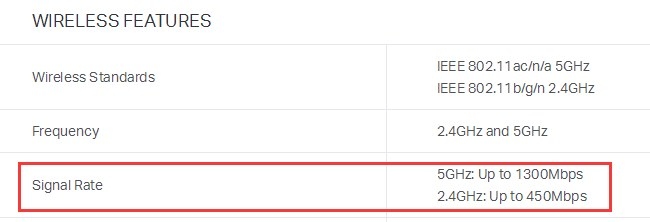
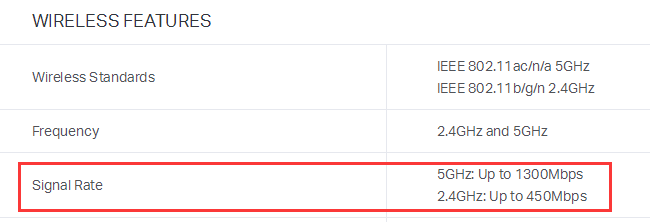
The signal rate in a router’s specifications is its maximum wireless link speed, not the internet speed supplied by your ISP. Wireless link speed describes the internal WLAN connection between the router and a computer or other wireless client.
The factors limiting a link depend on its connection type:
- Wired: Router and adapter Ethernet port types, plus the Ethernet cable.
- Wireless: Environmental or physical interference, router and adapter hardware specifications, antenna count, and other factors.
For checking instructions, consult How to check the associated/link speed on a wireless client. For theoretical 802.11 rates, see *Tech Article* 802.11 Wireless Rate Calculation.
Why Is the Wireless Link Below the Router’s Maximum?
Each client negotiates its own rate according to wireless mode, distance, and noise from other wireless transmissions. In the example, 325Mbps is the actual link speed, while 1300Mbps is the router’s supported maximum on 5GHz.
Further explanation appears in *Tech Article* Theoretical wireless rate and actual wireless rate.
Why Does a 300Mbps Router Show a 100Mbps Wired Link?
The 300Mbps rating applies to the wireless link. A wired local connection instead depends on the router’s LAN ports, Ethernet cable, and computer Ethernet Adapter. With 100Mbps LAN ports and a compatible cable and adapter, the link will normally show 100Mbps.
Why Does a Speed Test Show Only 50Mbps on a 300Mbps Router?
The source describes 3300 Mbps here as an internal wireless link rate between the router and computer, rather than actual internet speed. Internet throughput is constrained by the slowest point along the network path. ISP service, interference, server stability, surroundings, and other conditions all affect the result.
What Can Prevent Full Fiber Speeds?
Internet performance depends on your purchased speed, service connection type, router capability, provider network load, and cables. Routers also differ in their WAN-to-LAN NAT throughput; the TL-WR841N, for example, can handle about 90 Mbps.
For TP-Link router WAN-to-LAN NAT throughput information, refer to https://www.tp-link.com/support/faq/465/.
Why Can’t Wireless Devices Reach the Advertised Rate?
Some Archer users report low client speeds despite having a high-bandwidth ISP service. The WAN port can explain this limitation.
For example, the Archer C60 has a 100M WAN port connected to the ISP line, limiting total internet transmission through that port to 100Mbps. Clients may negotiate 450Mbps(2.4GHz) or 867Mbps(5GHz) wireless links, but their internet downloads and uploads still cannot exceed 100Mbps.
Which WAN Port Speed Do I Need?
For an ISP plan above 100Mbps, consider a router with a 1000Mbps WAN port, such as Archer C9/C8/C7/C5/C2. Fast Ethernet ports support up to 100Mbps; Gigabit Ethernet ports support up to 1000Mbps.
If your ISP speed is well below 100Mbps, a router with a 100M WAN port is sufficient: it does not reduce that available bandwidth and can still offer better transmission speeds within the LAN.
Why Does an 8M Service Download at 1MB/s?
An ISP’s advertised 8M usually means 8Mbps. Mbps or Mb/s measures megabits per second, whereas MBps or MB/s measures megabytes per second. There are 8 bits in a byte, so 1MBps = 8Mbps. Check the capitalization before comparing figures: the units differ by a factor of eight.

