
Check Whether Your Windows Laptop Supports 2.4 GHz or 5 GHz Wi-Fi
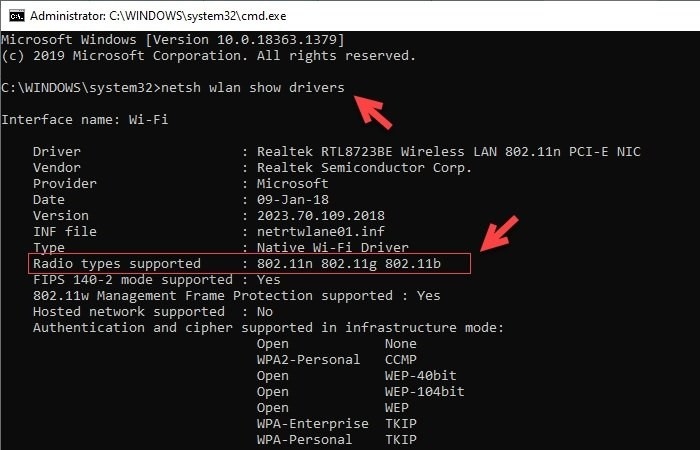
Use Command Prompt in Windows 11/10 to inspect your laptop’s supported Wi-Fi radio types and identify its band support. The guide also compares the bands and explains where to check the adapter’s status and preferred band.
What We Know
Before choosing a router, you can check whether your Windows 11/10 laptop supports 2.4 GHz, 5 GHz, or both by inspecting its wireless driver information.
Choosing between 2.4 GHz and 5 GHz

Neither band is best for every situation. If your laptop supports both, choose according to coverage and speed needs:
- 2.4 GHz reaches a larger area and penetrates walls and other solid objects.
- 5 GHz offers speeds of about 1 Gbps. With fewer devices supporting the frequency, it avoids the congestion associated with 2.4 GHz.
For wider coverage, 2.4 GHz is the better choice; for faster internet, 5 GHz is preferable.
Check supported bands with Command Prompt
- Open Command Prompt through the WinX Menu.
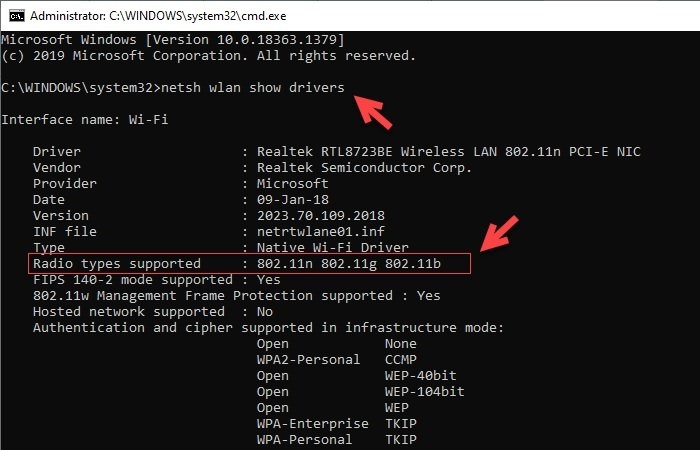
- Enter “netsh wlan show drivers” and press “Enter.”
- Find “Radio types supported” and interpret the listed standards using the guide below.
- 802.11g and 802.11n indicate support for 2.4 GHz only.
- 802.11n, 802.11g, and 802.11b also indicate support for 2.4 GHz only.
- A list containing 802.11a or 802.11ac indicates 5 GHz support. This means both bands are supported, since no laptop supports only the 5GHz band.
The pictured example lists 802.11n, 802.11g, and 802.11b, indicating 2.4 GHz support only. If needed, you can switch between 2.4 GHz and 5 GHz Wi-Fi bands.
Check the wireless adapter’s status
Find “Device Manager” through Windows Search and expand “Network adapters” to locate the wireless card. An exclamation mark, red “X,” or down arrow beside its name indicates a connectivity problem or a disabled adapter.
Set the laptop to detect 5GHz Wi-Fi
In Device Manager, select the Wi-Fi adapter and open “Properties.” On the “Advanced” tab, change the preferred band to 5GHz. The router must support 5GHz, and the laptop’s Wi-Fi adapter must be compatible with both 2.4GHz and 5GHz frequencies.

